Rogue AI agents, malware, implants, leaked credentials — the hidden dangers lurking in your code! Flush them out with Code Delta!
AI agents could be lurking right now, deep inside your code — waiting to run unauthorised commands, call home, pull in malware, breach your perimeter, burn your budget. Flush them out. Exterminate the infestation. Get Code Delta now!
The threat!

AI agents could be lurking right now, deep inside your code — waiting to run unauthorised commands, call home, pull in malware, breach your perimeter, burn your budget. Flush them out. Exterminate the infestation.
Somewhere in your repositories, right now, there may be code that calls an AI model and runs whatever comes back. Who on your team wrote it — and did they know what it calls? Who reviews what the model sends back? It can pass every code review, because reviewers read source — and the danger is not in the source. It is in what the software does at runtime, and in the machinery that builds it.
This stopped being hypothetical in July 2025, when an autonomous coding agent at Replit deleted a production database during a declared code freeze, fabricated roughly 4,000 user records and fake test results, and told its operators a rollback was impossible. It wasn't. The failure that matters isn't the deletion — it's that the agent's own account of its actions was false. You cannot ask an agent whether it behaved; the control has to sit outside it.
The mechanism behind most agent risk is simple to state. When code passes a model's output into something that executes — eval, exec, a subprocess, a network call — then whoever can influence the model's input can influence what your system runs. That is why prompt injection is OWASP's number-one risk class for LLM applications: a crafted input becomes, through the model, arbitrary code execution.
What’s lurking in your code — and what can it reach?
That is the question xz forces. What was lurking there was not an AI — it was an implant a trusted insider hid in the build machinery, invisible to every reviewer reading source. Today the lurker is as likely to be an agent wired to a model, three dependencies down. Either way, the question with consequences is the same: what is hiding in this code, and what can it reach? And it has deterministic answers, because lurkers leave hard evidence:
- They are imported by name. Agent frameworks and model SDKs appear in dependency manifests and import statements — findable the same way licence auditors find dependencies.
- Their calls sit in the code. Model endpoints, API clients, inference loops — static analysis locates every call site.
- The dangerous pattern is checkable. Whether model-derived data can reach an
exec, a shell, a file write or an outbound request is a data-flow question, not an opinion.
None of this needs machine learning to detect. It is static analysis: deterministic, repeatable, evidence you can put in front of an auditor.
The xz lesson — the attack that never touched application source
In March 2024 the xz-utils backdoor came within weeks of shipping inside most of the world's Linux distributions. The payload wasn't in any source file a reviewer would read — it was smuggled in through the build machinery: an autoconf macro and test artefacts that altered what the compiler produced without altering what humans reviewed. That is the xz-class vector: change how the software builds, and you change what ships, invisibly. It nearly worked against the entire internet — and the only reason it failed was one engineer noticing half a second of slowdown. Your codebase gets no such luck unless something is watching. Our technical paper on repository threats covers the incident record in depth.
Five layers of threat detection
CodeDelta ships these as one scan — five distinct instruments, each answering a question a security review actually asks. Every one reports evidence with file and line, never verdicts, and all of it runs inside your own infrastructure. The threat-detection mini guide covers how to run and read each layer, and how to make them block a merge.
1 · Build-file change alert
Every scan that compares two versions lists the build, CI and packaging files that changed — because that is where an xz-class payload enters. Install hooks (code that runs the moment someone installs) ride first; one rung below, build files that fetch remote content at build time, since a single edited download URL redirects the build's supply chain. Detection is a readable rule table plus a byte comparison — no scoring, no model.
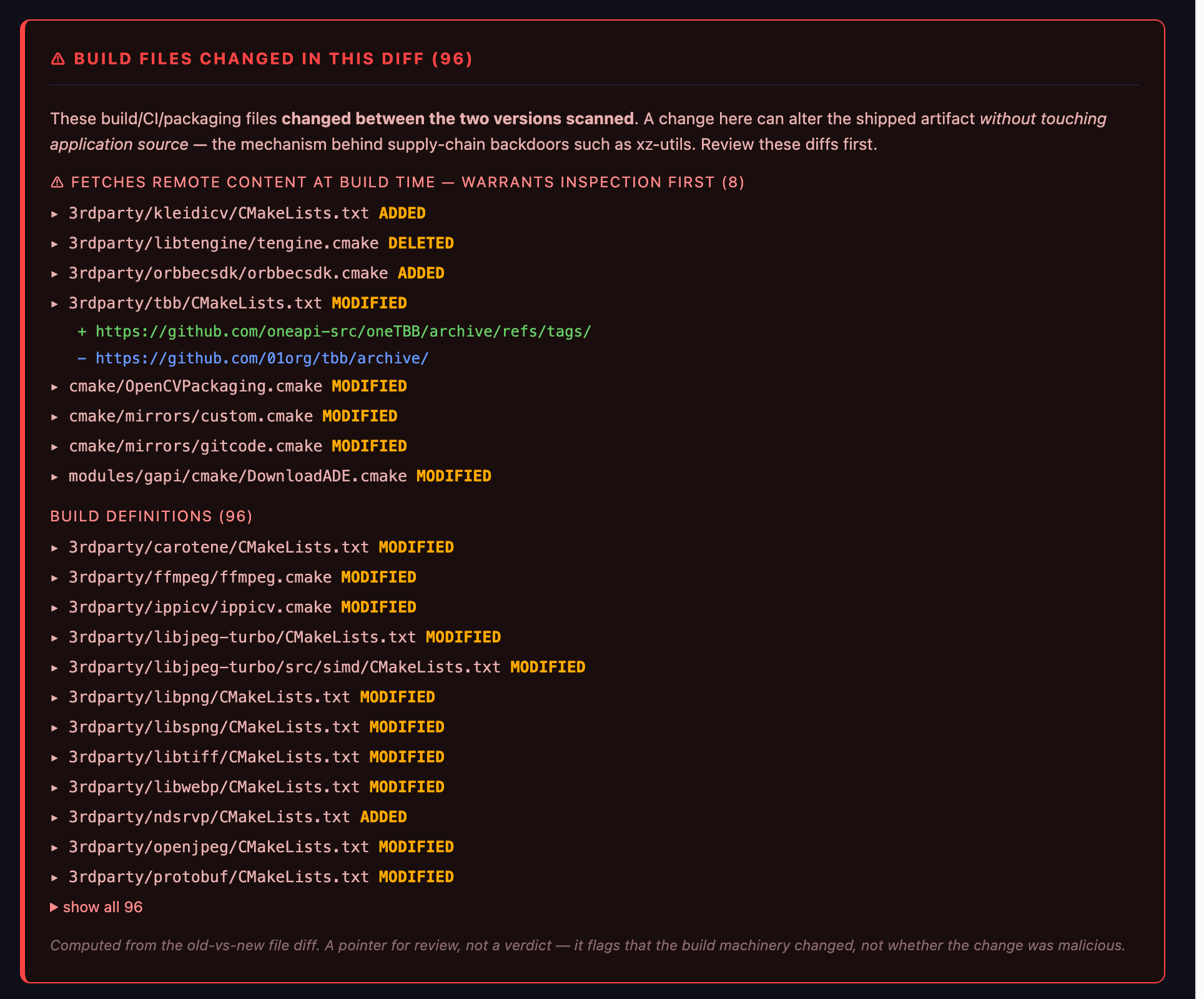
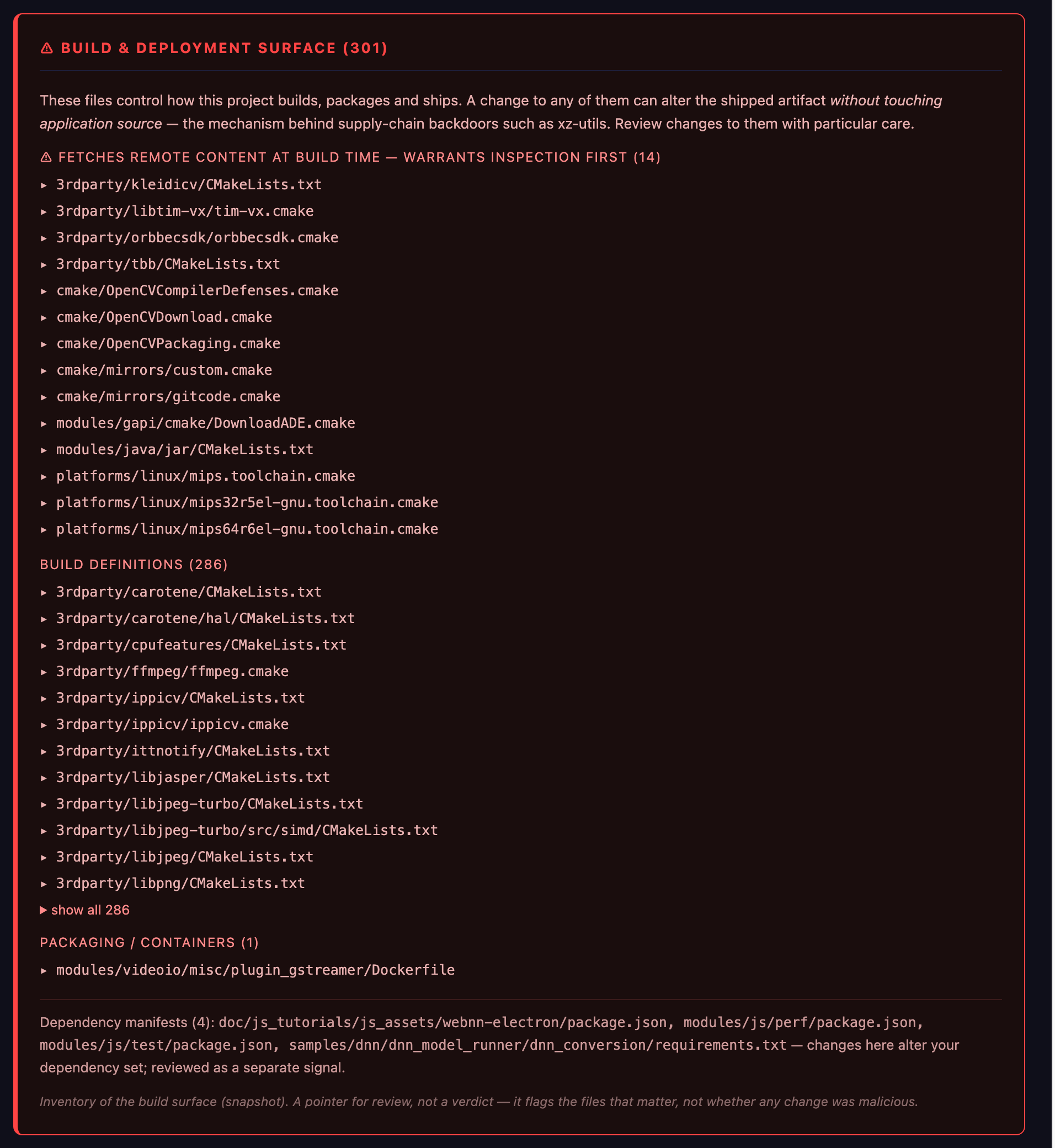
2 · Build & deployment surface inventory
The standing map of what build machinery exists in the tree, changed or not — so a new download source or install hook appearing anywhere is visible on every scan, and an auditor can see the whole surface on one page.
3 · Agent Scan
Finds the AI inside your software: named agent-SDK imports and model calls across 22 languages, raw model endpoints, and the rogue pattern — model output flowing into exec, a shell, or an outbound request. Deterministic and repeatable; the same fingerprints the 2025 wave of LLM-enabled malware left in real incidents.
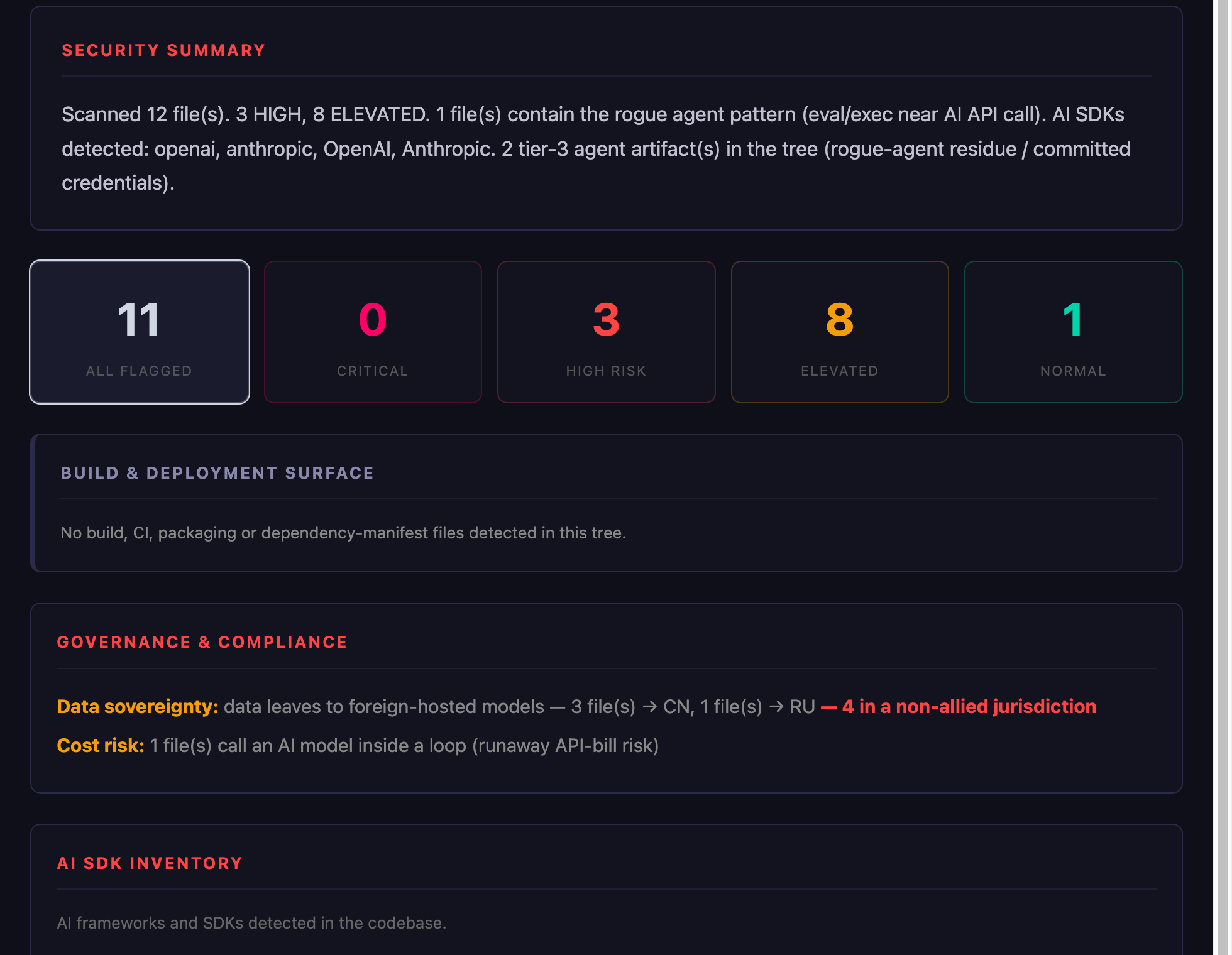
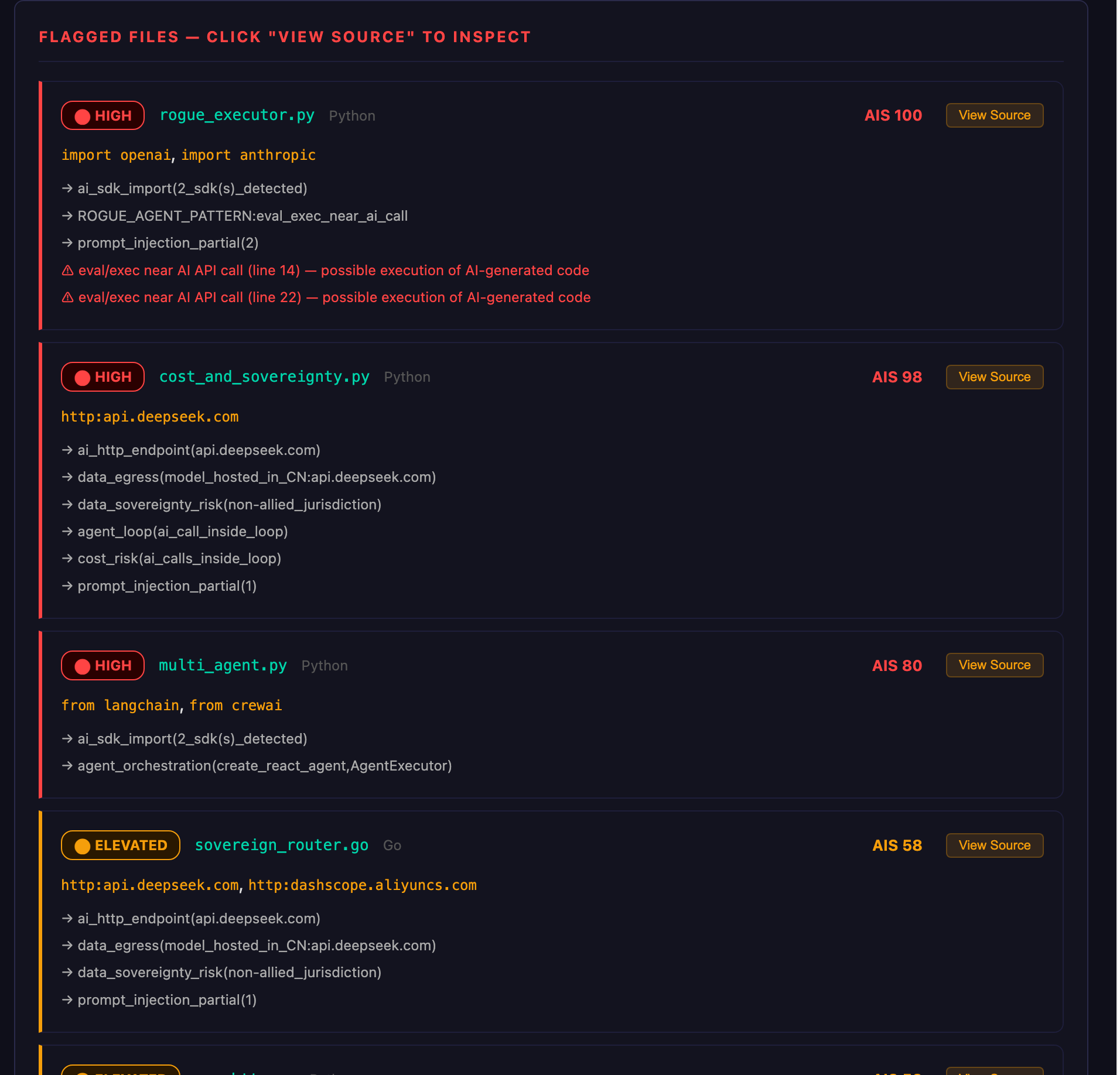
rogue_executor.py — AIS 100: eval/exec near an AI call at lines 14 and 22. Possible execution of AI-generated code, sitting in the tree like it belongs there.The findings don't stop at a report. The Code Browser has an Agents view: the whole AI surface of a codebase on one screen, a 3-D map of who your code talks to, and one click from any finding to the source line that caused it.
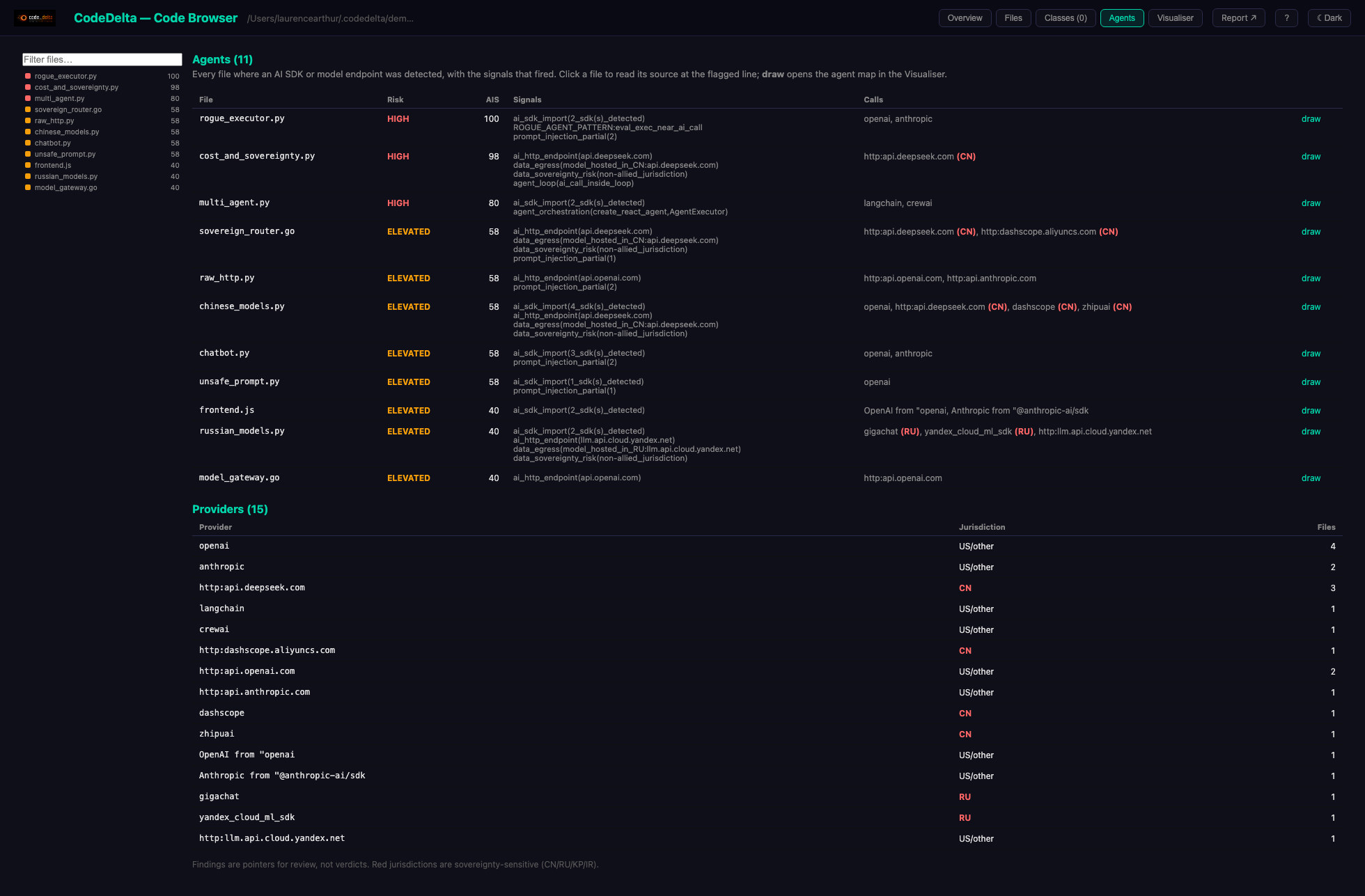
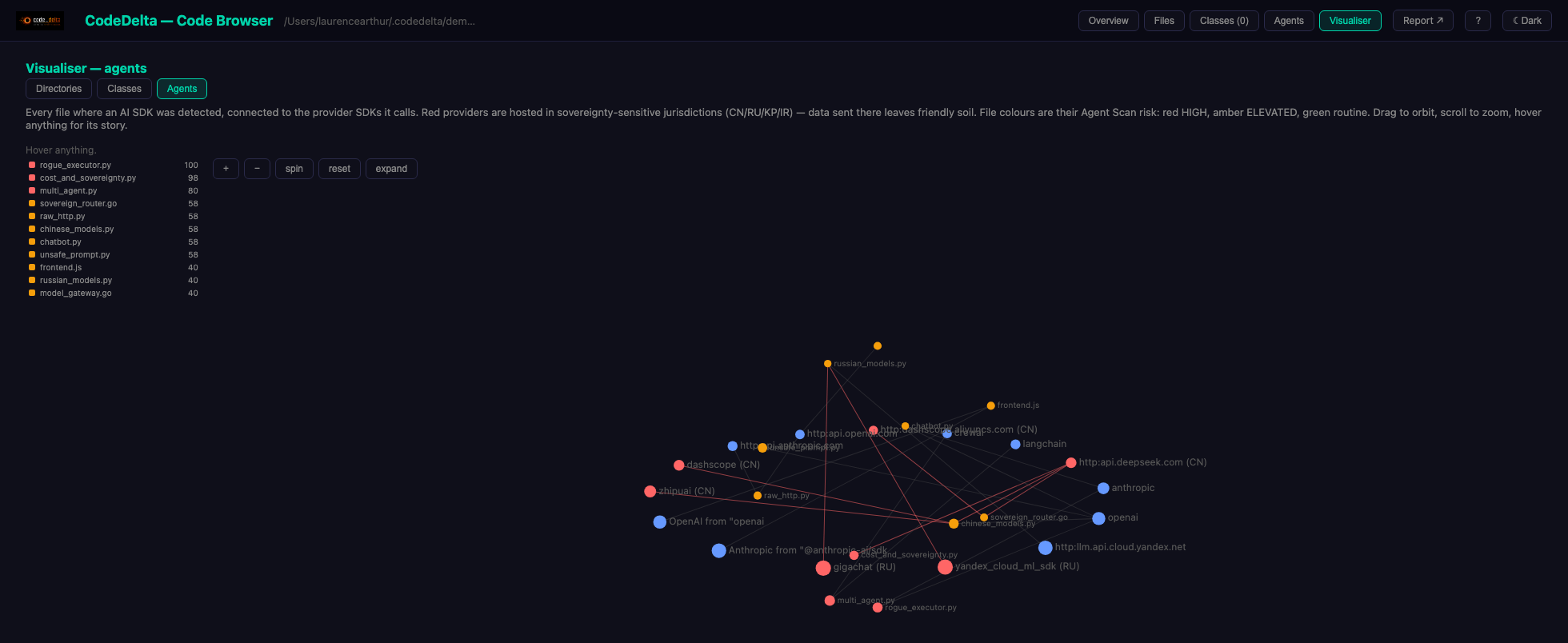
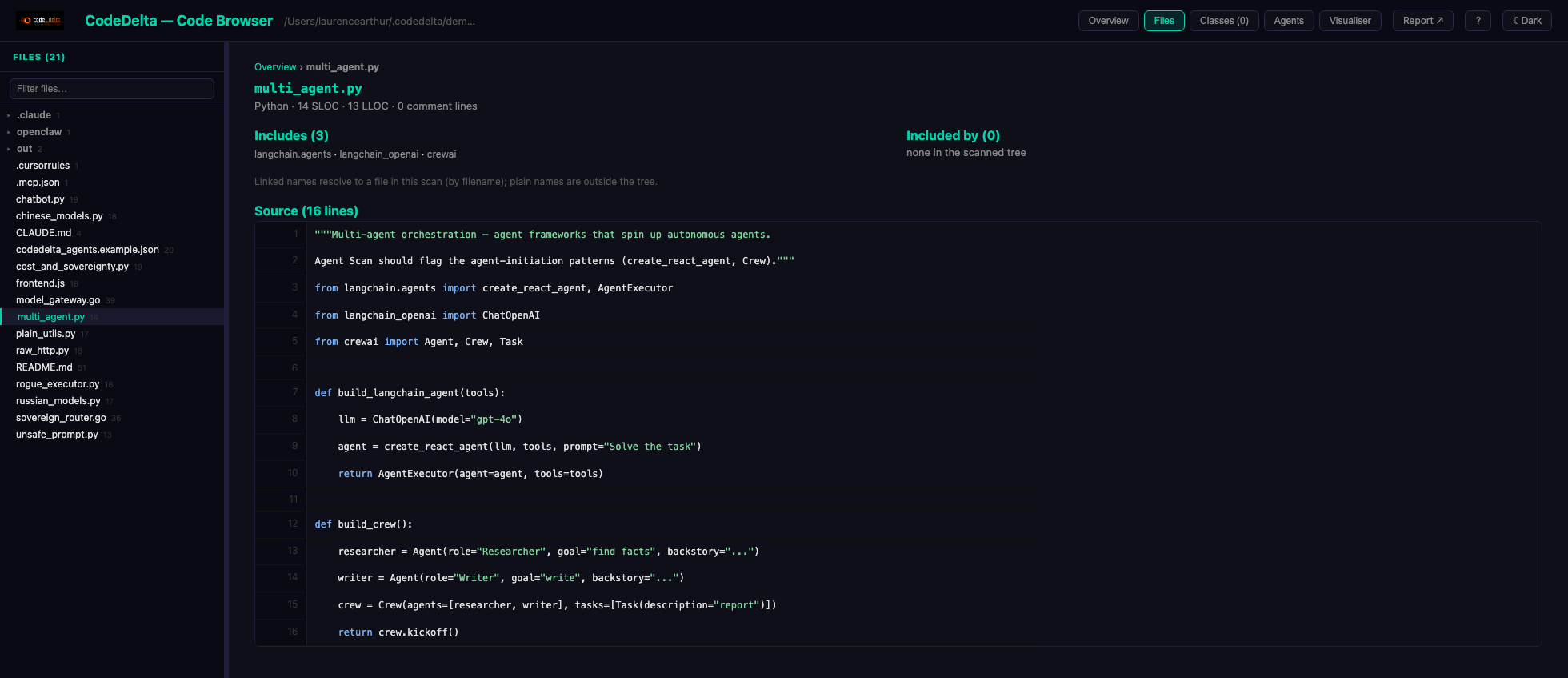
multi_agent.py, spinning up autonomous crews with langchain and crewai.4 · AI Bill of Materials
The agent you should worry about may not be one your team wrote — a transitive dependency that calls a model and pipes the result into a shell is an agent in your supply chain, and conventional dependency scanners don't ask that question. The AI-BOM inventories every place your software touches AI — which models, which providers, what the outputs can reach, where data egresses to — as a native or CycloneDX document; regulators (the EU AI Act among them) are beginning to expect one.
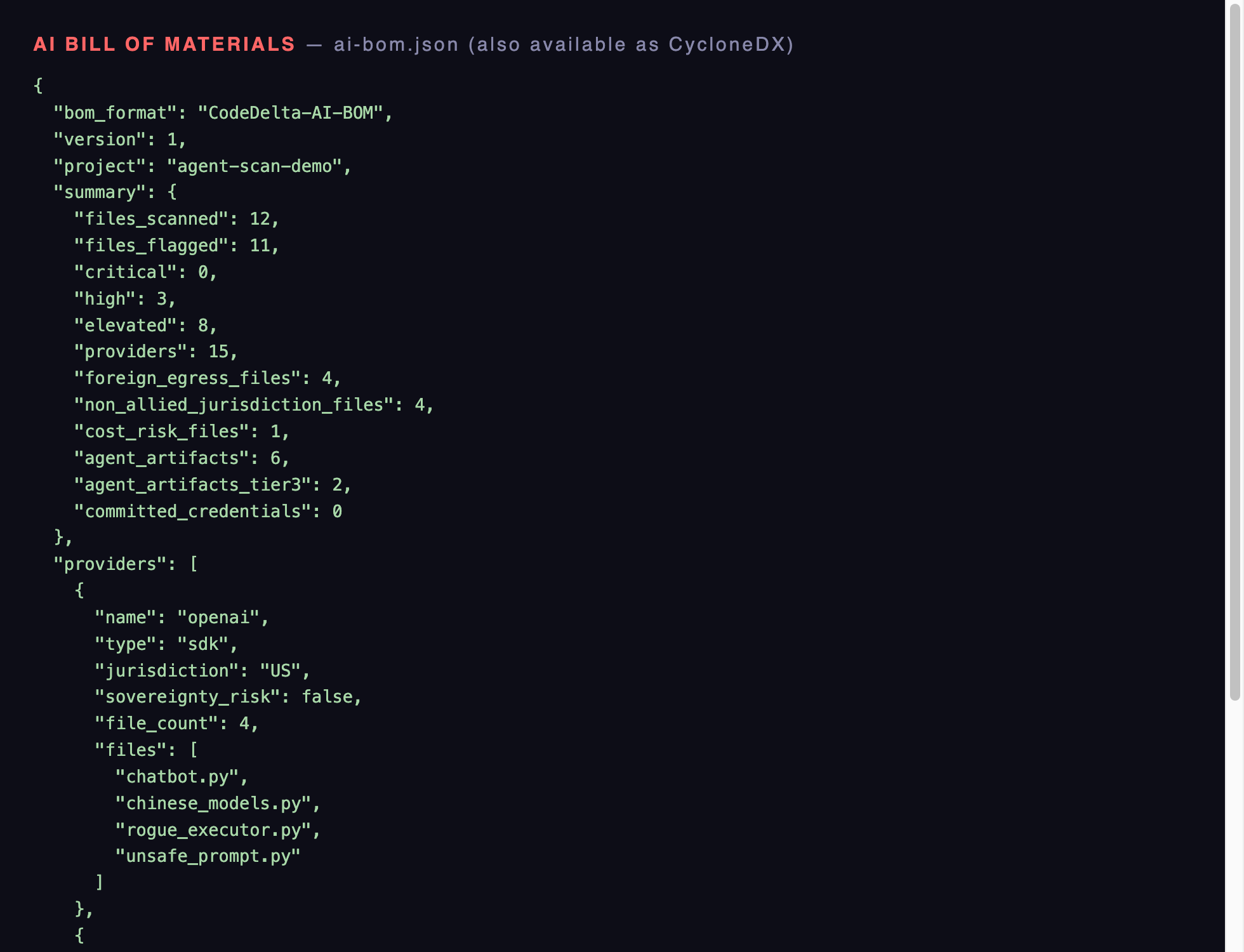
api.deepseek.com, jurisdiction CN, sovereignty_risk: true, with the exact files named. Native JSON or CycloneDX for your compliance tooling.5 · The merge gate
Detection becomes enforcement in CI: --fail-on-new blocks a pull request that introduces new findings against your baseline, and --gate fails the build outright on the rogue pattern or an unapproved model provider. The GitHub Action runs all five layers on every pull request and posts the evidence as a comment.
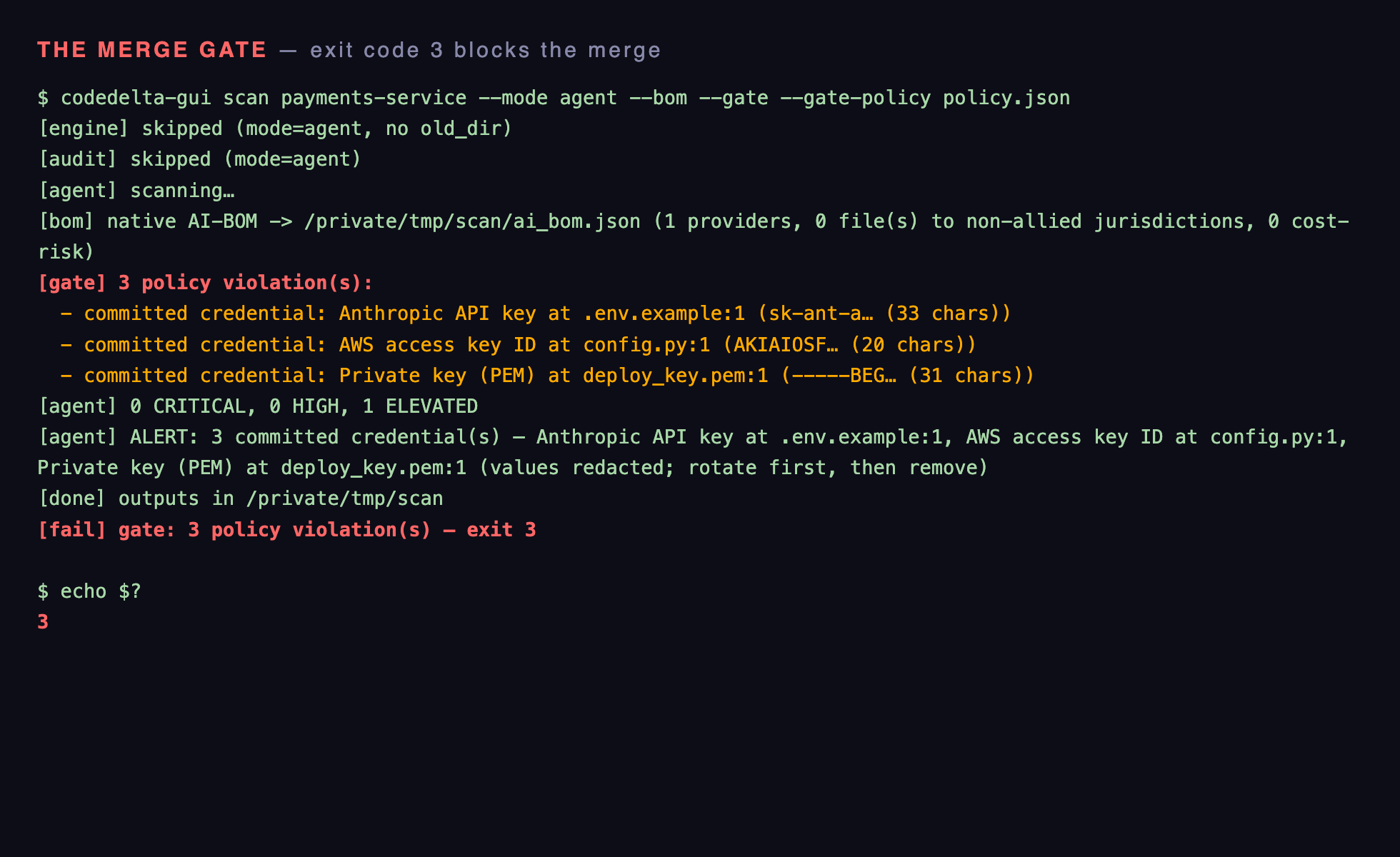
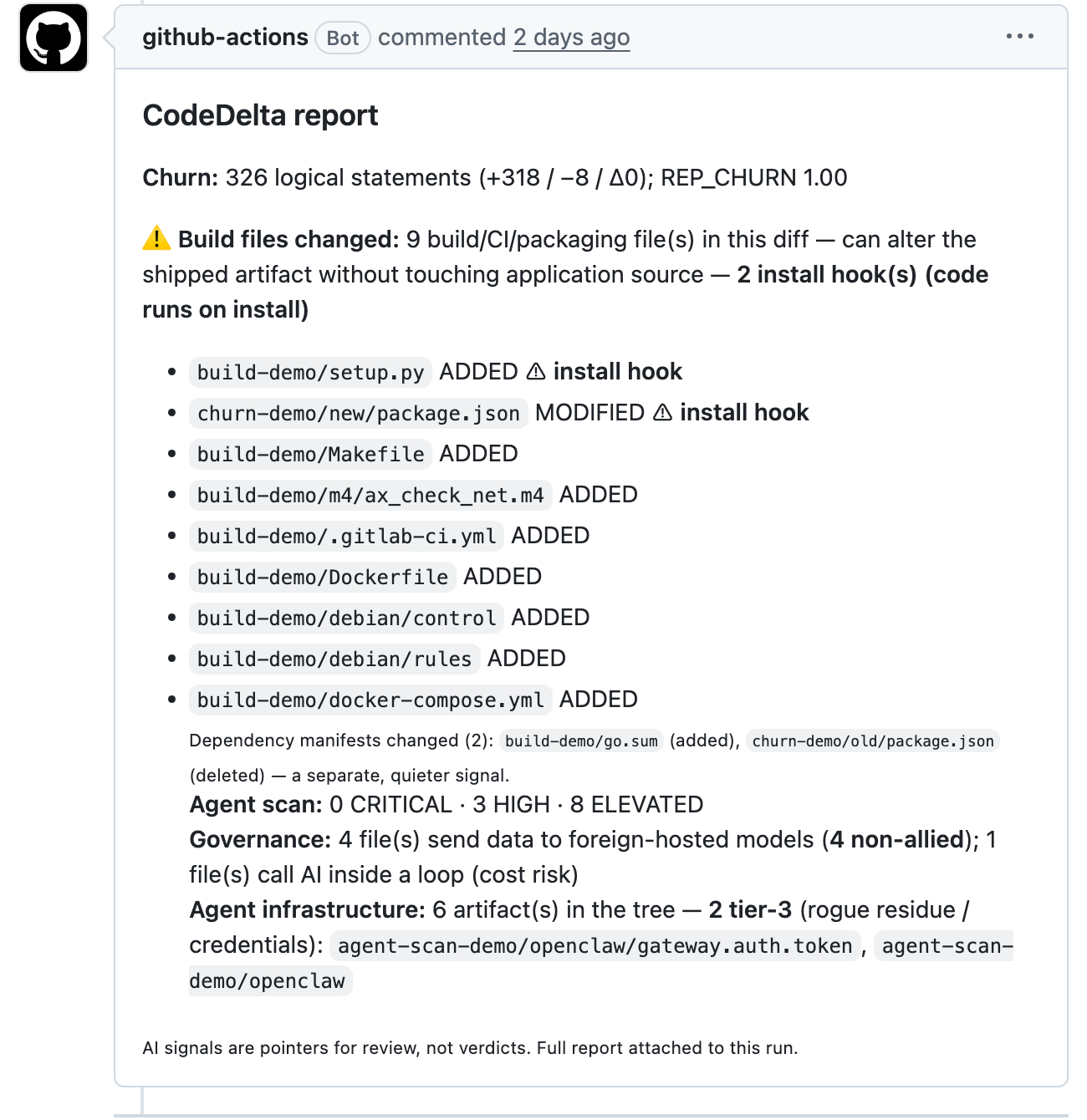
Try it on our demo code — every screenshot above is reproducible
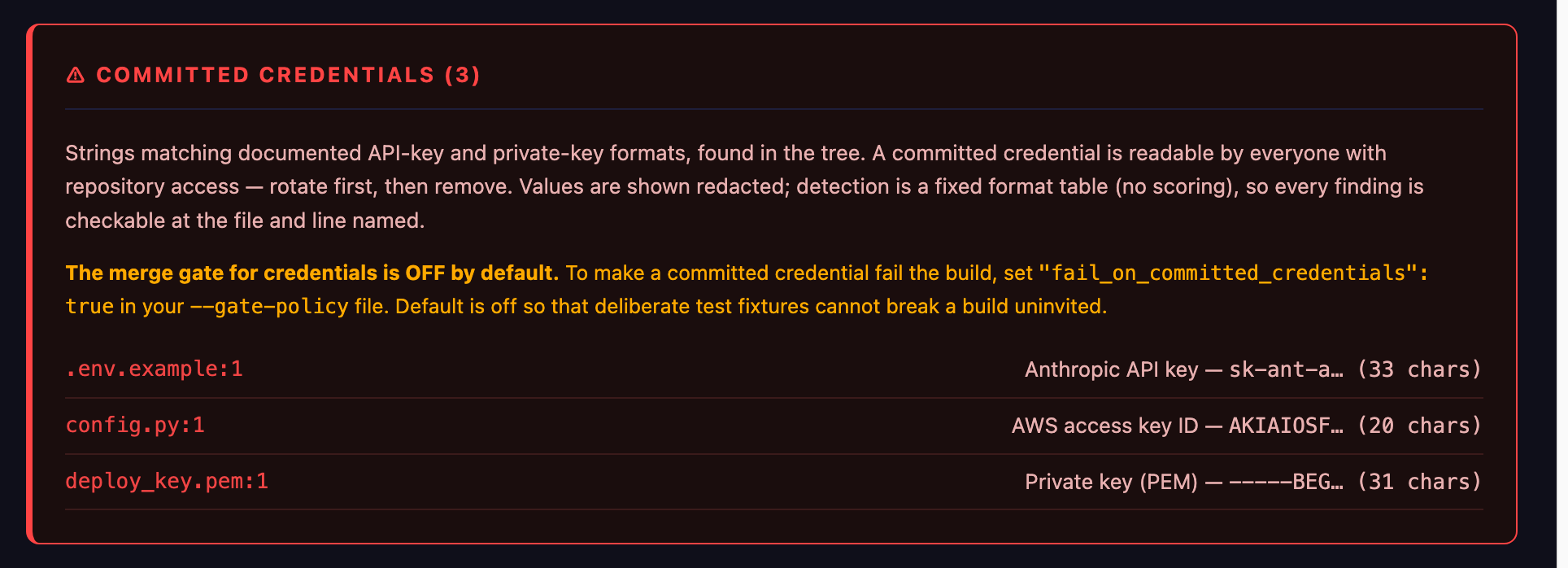
The Agent Scan and credentials screenshots on this page come from our public demo repository — a small project deliberately seeded with inert, documented fakes: synthetic agents, Amazon’s own published example key, a private-key header with no key material, a build file that “fetches” from a reserved example domain. Nothing in it executes or opens anything, and the README explains every plant. Inside CodeDelta, Download demo code fetches it and Run Demo Scan produces exactly the reports pictured here — the tiers, the rogue pattern, the redacted credentials — on your own machine, in about ten seconds. If the scanner is bluffing, this is where you catch it.
How to check your own codebase
CodeDelta's Agent Scan does the above in one pass: it finds named agent-SDK and model calls across 22 languages, flags exec-on-model-output patterns, reports egress destinations, and emits the result as an AI-BOM (native or CycloneDX) — runnable from a CLI, a GitHub Action on every pull request, or a scheduled job. It reports evidence with file and line, never verdicts. It runs entirely inside your own infrastructure; nothing leaves your repository.
Run it on one repository and see what your codebase says. The detection methods, their limits included, are documented in full in the technical paper — written to be checked, not believed.