The idea in one sentence
Everything dangerous that hides in a repository — an implant, a rogue agent, a leaked key — leaves hard, checkable evidence, and CodeDelta has five instruments that each look for one kind of it, all running in a single scan, all reporting file-and-line facts rather than opinions. Nothing here uses machine learning and nothing leaves your infrastructure: every detector is a readable rule table an auditor can inspect, and every finding names the file and line so you can check it yourself. Findings are pointers for review, never verdicts of malice.
Layer 1 — the build-file change alert
The question it answers: did anything change about how this software
builds? When you scan two versions, it lists every build, CI and packaging file that
changed — because that is where the xz-utils backdoor hid: change how software
builds and you change what ships, without touching source anyone reviews. Two kinds of
file ride the top of the alert, always shown in full: files with install hooks (code that
runs the moment someone installs the package — a package.json
postinstall, a setup.py cmdclass), and files that
fetch remote content at build time, because editing one download URL redirects the whole
supply chain. For a changed fetcher the alert goes further and prints the URL delta itself
— + github.com/oneapi-src/…
− github.com/01org/… —
a reviewer’s decision made in one glance. Detection is a filename rule table plus a byte
comparison; the fetch sniff is a fixed list of download constructs
(file(DOWNLOAD, ExternalProject_Add, curl,
wget…). CI pipeline files are deliberately exempt from the fetch tier —
CI fetches by nature, and flagging every workflow would bury the signal.
Where you see it: the GUI’s Churn Results box, the agent report,
the CLI’s [build] lines, and the pull-request comment. It appears on every
scan that compares two versions, in every mode.
Layer 2 — the build & deployment surface inventory
The question it answers: what build machinery exists in this tree at all? The same detection, run over everything present — changed or not. On OpenCV that is 301 files, 14 of them fetchers, on one page. The point is the standing map: a new download source or install hook appearing anywhere is visible on every scan, and an auditor sees the whole attack surface without reading a single Makefile. Every agent report opens with it; a tree with nothing to show says so explicitly, because an empty section must never look like a broken feature.
Layer 3 — Agent Scan
The question it answers: is there an AI inside this software, and
what can it reach? Agent Scan finds the code that calls AI at runtime: agent-SDK imports and
model calls by name across 22 languages, raw model endpoints (a bare POST to
api.deepseek.com needs no SDK), and the rogue pattern — model output
flowing into exec, eval, a shell or an outbound request, which is the
mechanism that turns prompt injection into code execution. It also inventories the artifacts
agents leave in a tree — instruction files, agent workspaces, and tier-3 residue such as a
committed gateway token. Every hit carries the file, the line, and the signature that fired.
Honest limits, stated up front: the endpoint list is a maintained table, so an unknown or deliberately obfuscated endpoint can evade it; detection is of initiation signatures, not intent. Pointers, not verdicts — the technical paper documents the method and its limits in full.
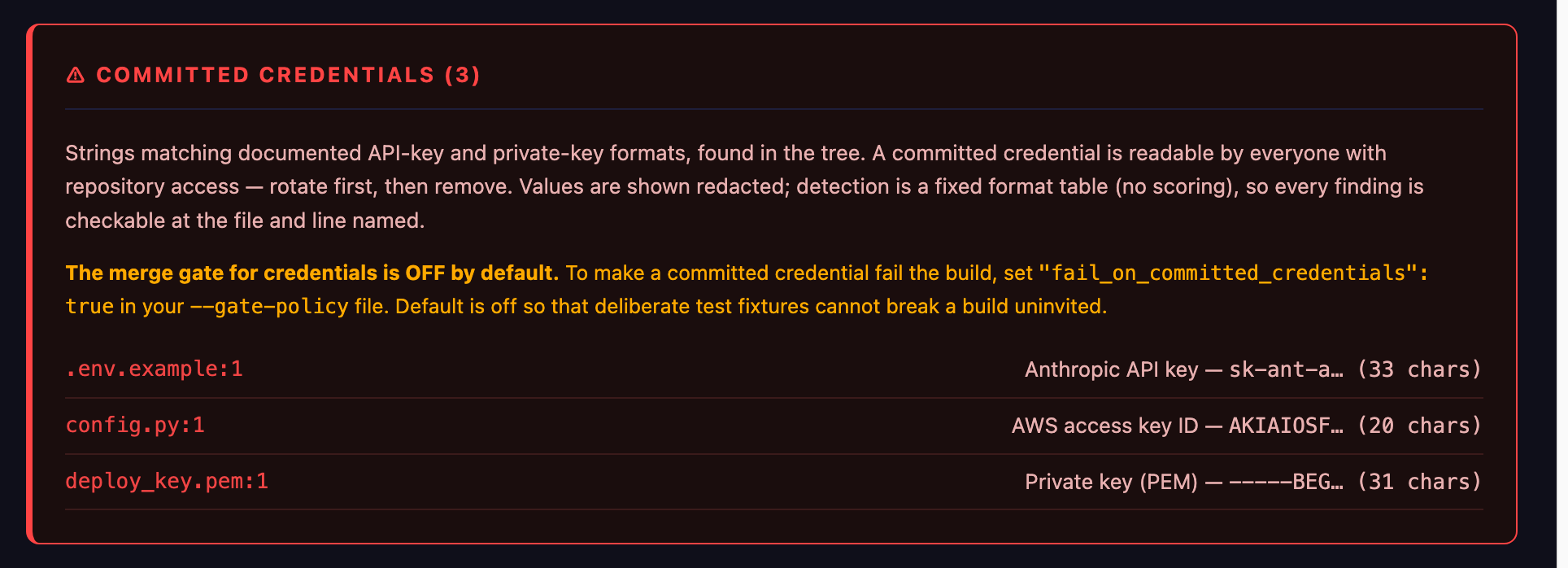
Committed credentials — part of the Agent Scan layer
The question it answers: is there a key sitting in this
repository? A committed credential — an API key, an access token, a private key
— is readable by everyone with repository access, in every clone, backup and CI runner,
and git history preserves it after deletion. They end up committed through ordinary accidents:
a pasted test key, an unignored .env file. CodeDelta detects them with a fixed
table of documented key formats — AWS AKIA…, GitHub ghp_…, OpenAI,
Anthropic, Google, Hugging Face, Slack, Stripe live keys, PEM private-key blocks. No entropy
guessing, no scoring: a string either matches a vendor’s published format or it is not
flagged. Verified against OpenCV’s full clean tree: zero false alarms.
Redaction, everywhere: findings show the first eight characters and the length, never the value — and the report’s embedded source viewer is scrubbed the same way, because reports travel: they get attached to CI runs and emailed to managers. The correct response to any finding is rotate the key first, then remove it from the tree — removal without rotation leaves the key valid in git history.
Layer 4 — the AI Bill of Materials
The question it answers: where does our software touch AI, on the
record? Everything the layers above find, condensed into a document: every provider your
code calls, its hosting jurisdiction, whether data leaves to somewhere sensitive
(sovereignty_risk: true against CN / RU / KP / IR), cost-risk call sites, agent
artifacts, committed-credential counts — each with the files named. Emitted as native
JSON or CycloneDX (--bom --bom-format cyclonedx) so it drops into existing
compliance tooling. Regulators are beginning to expect exactly this record; the EU AI Act is
the one your auditors will name.
Layer 5 — the merge gate
Where detection stops being advice. Two mechanisms, both in the GitHub Action and the CLI:
| Mechanism | What it does |
|---|---|
--fail-on-new | Blocks a pull request that introduces new findings
against your recorded baseline (--write-baseline on a trusted commit first).
Exit code 3 fails the check. |
--gate | Fails the build on policy, regardless of baseline: the rogue pattern and egress to denied jurisdictions are on by default. |
Three further switches ship OFF by default — deliberately, so a
deliberate test fixture can never break a stranger’s build uninvited — and turning
them on is one line in your --gate-policy file:
fail_on_committed_credentials fails any build with a key-format
match in the tree. fail_on_new_install_hook and fail_on_new_fetcher
fail a diff in which that behaviour appears — new is computed honestly against
the old side, so a project that has always fetched does not suddenly fail; only the diff where
fetching started does.
Running it
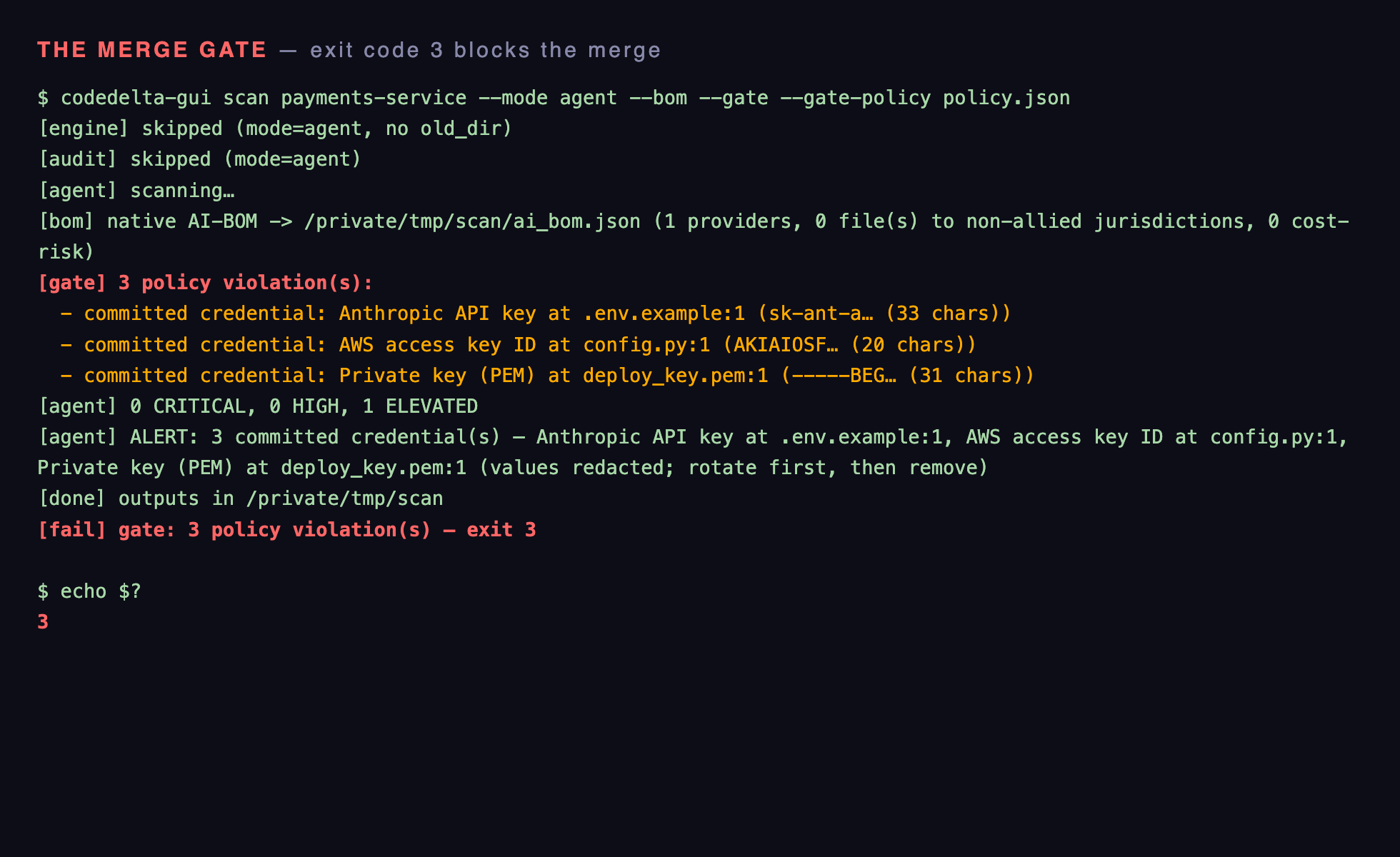
Every layer runs in one scan. From the GUI: Churn + Agent Scan on two versions gives you all five surfaces. Headless, the same thing is:
What comes back on the terminal: [build] ALERT: with
per-file status lines, ** install hook ** / ** fetches remote content at
build time ** markers and the +/− URL delta beneath a
changed fetcher; [agent] tier counts, artifact and
ALERT: N committed credential(s) lines (values redacted), then the gate-off notice
naming the exact policy key to flip; [bom] summary; [gate] pass or an
itemised violation list. Exit code 0 clean, 3 on a --fail-on-new regression
or a gate failure — the exit code is what blocks the merge in CI. The agent report and the
AI-BOM are written alongside for the humans.
On every pull request, the GitHub Action runs the same scan inside your own runner and posts the evidence as a comment — nothing about your code leaves your infrastructure, which is usually the security reviewer’s first question.
Limits
None of this claims to detect malice. Every instrument is a pointer that puts a reviewer in front of the right file with the right question, before the merge instead of after the incident. The methods and their limits are documented in full in the repository-threats paper and the agent-detection paper. To run all of it on your own tree, download Code Delta.