Introducing CodeDelta AI Agent Tracer
27 September 2026 · what Agent Tracer does and why · reads Claude Code, Codex, Cursor, GitHub Copilot CLI and Gemini CLI logs · CodeDelta AI Agent Tracer will be included with release 2.2.0
What exactly is AI up to inside your organisation? Your coding agent keeps a detailed diary – it tells you everything you need to know!
Summary
Every coding agent writes a complete record of what it did to the machine it runs on, and nobody reads it. Agent Tracer is the CodeDelta tool that reads those records after the fact and produces one report: what the agent ran, deleted, pushed and sent, to which hosts, under which model, what the human refused, and what each session was for. It runs offline, sends nothing, and re-uses the rules and ratings of the Agent Scan. It is for whoever is accountable for agents they did not watch. It reads the logs of Claude Code, Codex, Cursor, GitHub Copilot CLI and Gemini CLI. What it finds on 3,900 published agent runs is in the companion study.
The problem
A coding agent takes an instruction in plain words, asks a language model what to do, and then does it: runs a shell command, edits a file, fetches a web page, asks for permission, tries again. Every popular agent writes that sequence to disk as it goes. Claude Code appends one line of JSON per event to a file under the user’s home folder; OpenAI’s Codex does the same in a folder of its own; GitHub Copilot’s command-line agent, Gemini CLI and Cursor each keep an equivalent. The file holds the human’s prompts, the model’s replies, every tool call with its arguments, every result, the name of the model in charge, and the timestamps. It is the only complete account of what the agent did that exists outside the vendor’s servers.
Almost nobody opens it. The file is large (a working developer produces hundreds of megabytes in a few months), there is no viewer, a tool call and its result are two records apart, and secrets sit in it in plain text. Claude Code deletes it after thirty days unless told otherwise. So the one artefact that could answer “what did the agent do?” is written faithfully, kept briefly, and read by no one.
The evidence exists on every machine that runs an agent. What is missing is the reader.
Nothing on the market fills the gap. The vendors carry the traffic between agent and model, so they can count it, and counts are what they show an administrator: requests, editors, languages, suggestions accepted. GitHub states in its documentation that enterprise administrators cannot see Copilot prompts, suggestions or generated code through any dashboard, API or audit log. The observability products (LangSmith, Langfuse, Arize, Datadog’s LLM view) watch an application’s live model calls for the team that built it; none of the ones surveyed for this paper is a tool you point at a folder of finished logs. The regulation, where it applies, asks only that logs be kept: Article 12 of the EU AI Act requires high-risk systems to record events automatically so that risky situations can be identified after the fact, and says nothing about how anyone reads them. Surveys of enterprises put use of coding assistants near universal and governance of them at a minority; a written policy is common, and evidence that it is followed is rare.
What Agent Tracer does
Agent Tracer reads a folder of agent session logs and produces one report. It runs where the logs are, or on a folder they were copied to, and sends nothing anywhere. It is the Agent Scan’s idea pointed the other way: the Agent Scan reads source code and reports what agent code is present; Agent Tracer reads what an agent did and reports what it ran.
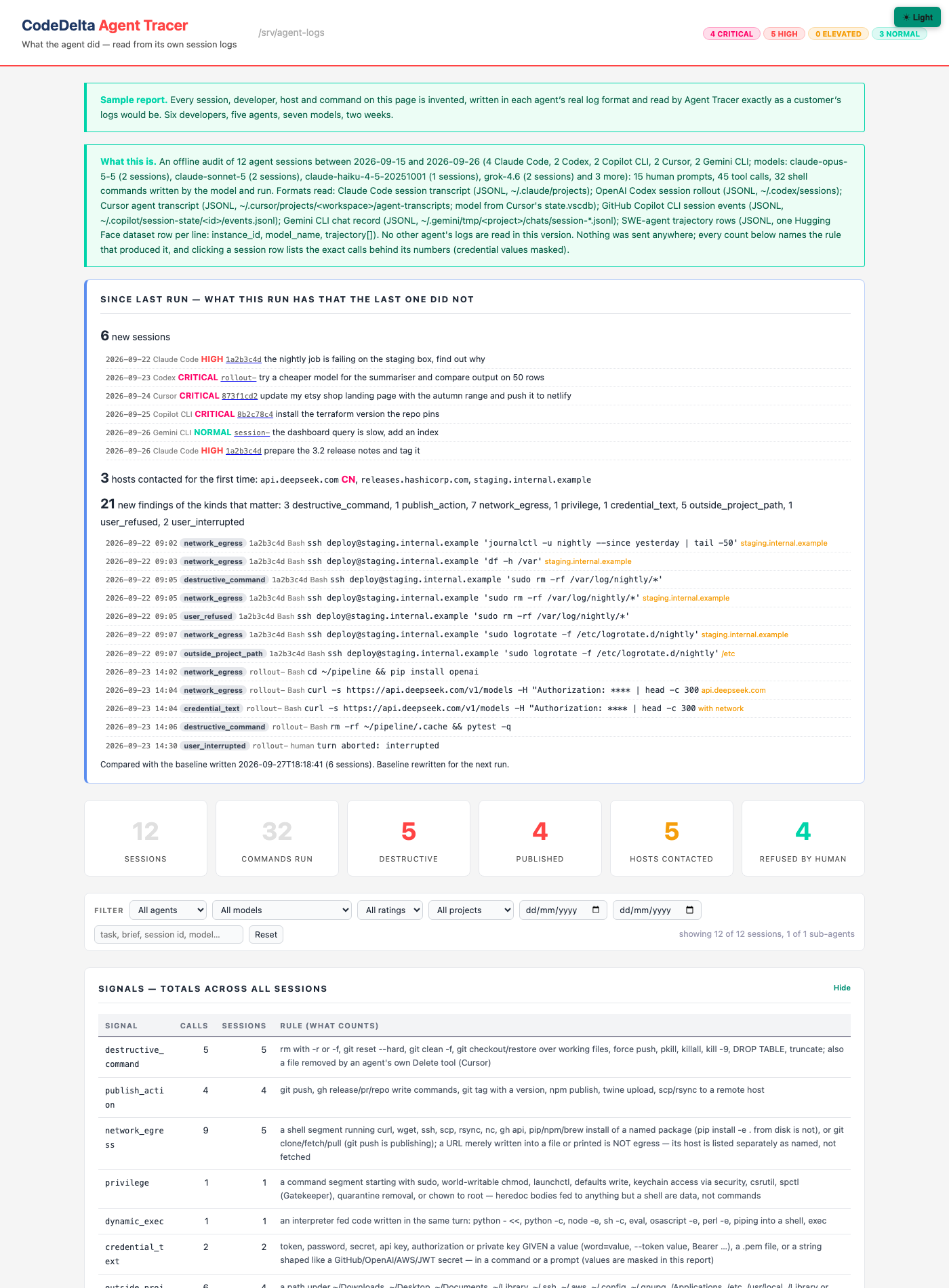
The reader reconstructs each session: the human’s prompts, the model’s turns, tool calls paired to their results, sub-agents the tool spawned, and the model in charge at each moment. Every shell command the model wrote and ran is then judged by a fixed set of rules, stated in words on the report beside each count:
| Signal | What counts |
|---|---|
| Destructive | rm with -r or -f, git reset --hard, git clean, force push, pkill, kill -9, DROP TABLE |
| Publishing | git push, releases, pull-request writes, version tags, npm publish, scp or rsync to a remote host |
| Network | curl, wget, ssh, package installs, git clone, any URL; the hosts reached are listed, with the country where the Agent Scan’s provider table states it |
| Privilege | sudo, world-writable chmod, launchctl, keychain access, Gatekeeper and quarantine changes |
| Dynamic execution | an interpreter fed code written in the same turn: python -c, node -e, sh -c, eval, piping into a shell |
| Credential text | a token, password, secret, key or authorization header given a value, a private-key file, or a string shaped like a known secret; the value is masked in the report |
| Outside the project | a path under Downloads, Documents, Library, .ssh, .aws, /etc, /Applications or the like, named in a command or written to |
| Refused, stopped, blocked | a call the human turned down at the permission prompt; a turn the human interrupted; a call stopped by a hook or policy rather than the human |
| Repeated | the same command run three or more times in one session |
Each session receives one of the Agent Scan’s four ratings, CRITICAL, HIGH, ELEVATED or NORMAL, from a rule printed on the page. The rating means a person should look, not that harm occurred: a force push to a private branch and a force push to main both count as destructive, and only the human reading the line under the number can tell them apart. So the report puts the exact command, its time, its model and its session one click under every figure, and never shows a credential’s value.
Three further parts of the report answer questions the counts cannot. What each session was for: the first thing the human asked, in the human’s own words. Which model was in charge and what each model did: turns, commands, reads, edits, web fetches and signal counts per model, and how many of a model’s turns were sub-agents the tool spawned on its own rather than a person’s choice. And what each sub-agent was asked and what it reported back, in the log’s words. A model that appears only as sub-agent turns was chosen by the tool; a session whose task line and project folder have nothing to do with the employer’s code says so without anyone opening a log. Filters by agent, model, rating, project, date and text keep a team’s worth of sessions readable on one page. A sample report, produced by the tool from invented logs of six developers on five agents, shows every part of the page.
Why it exists
The person it serves is whoever is accountable for an agent they did not watch. That is rarely the developer at the keyboard, who knows what happened because they were there. It is the manager with five developers running agents, the security lead asked which hosts the agents have been talking to, the auditor asking whether anyone was supervising, and the developer themselves a month later, after something went wrong. The questions are retrospective and specific: which sessions deleted things and what; which pushed to which remote; which hosts were contacted and whether a credential travelled with the request; how often the human said no, which is the human’s contribution to safety and is recorded nowhere else; which command wiped the folder, in which session, on which day; which models were used for what; and, across a team, whether the sessions on the company’s machines were about the company’s work.
Why now: agents that run commands are a 2025 and 2026 phenomenon, the logs they write have existed for about as long, the record-keeping article of the EU AI Act began to apply in August 2026, and the tools that read such logs after the fact do not exist. The first reader for a new kind of record tends to define what the record is for.
Why CodeDelta: the rules are the Agent Scan’s, re-pointed at executed calls instead of source text; the ratings, the report chrome and the command-line shape are shared; and the buyer is the same person the Agent Scan is sold to. The pair makes one offer, what agent code is in your source and what your agents did, which is a broader thing to sell than a churn tool with an AI hook. Two uses reach beyond a single organisation: comparison between models on the same kind of work, measured from what each actually ran rather than from a benchmark; and evidence that an acceptable-use policy is followed, in the shape an auditor asks for.
What it reads
Agent Tracer reads the session logs of Claude Code, Codex, Cursor, GitHub Copilot CLI and Gemini CLI, detected per file from the first record, with sub-agent transcripts folded into their parent session. Between the five, every frontier model through every widely used tool is covered. It also reads the published trajectory datasets that research groups release, which is how the companion study was made. The rules that judge a command are the same for every format, and each has a test case with its expected counts written before the code was run.
The logs are on developers’ laptops, deleted after thirty days by default in Claude Code’s case, and deletable by hand. Collection therefore uses the agents’ own mechanisms: for Claude Code, a managed settings file that developers cannot override, carrying a longer retention and a hook that copies each finished session to a folder the organisation controls. That is a script and a settings file beside the tool; the report is then run on the folder. The two sections below take this from one team to a company.
Deployment: the weekly delta
Churn’s unit is two snapshots of the code and the delta between them. Agent Tracer’s unit is two runs of the audit and the delta between those: the sessions, hosts, credentials and refusals that appeared since the last run. CodeDelta’s merge gate already works this way for source, writing a baseline of findings and failing a build only on what is new against it, and the same mechanism applies to the audit’s output. A run on Monday compares with the baseline the previous run wrote, saves a new one, and leads the page with the delta: fourteen sessions since last week, three hosts never contacted before, one request that carried a credential from a session that was not there last time, two sessions whose task line is not the company’s work. A quiet week is a few lines. A line worth a question is one click from the session, the developer, the day and the exact command. The full report with its filters sits underneath for anyone who wants more. The manager reads the delta, not the sessions.
Deployment: 1,250 developers, 50 projects, several countries
At that size nobody collects files by hand. The director uses two systems the company already runs for its laptops, and the tool sits at the end of them.
The setting reaches every machine through device management. A company of that size manages developer laptops with a tool such as Jamf or Intune, and that is how Claude Code’s managed settings file arrives: pushed to every Mac and Windows machine in every location, and not removable by the developer, because managed settings outrank anything a user sets. The director asks IT for one policy; IT deploys it as it deploys everything else.
The logs leave the machines by one of two routes. The first is the session-end hook described above with the destination changed: instead of a share it uploads each finished log to the company’s object storage, under a path built from the developer’s login and the machine. The volume is a few hundred megabytes per developer per month, hundreds of gigabytes across the company, which is small for a bucket and impossible for a file share. The second route is the one Anthropic built for exactly this: Claude Code can send every prompt, tool call and result as OpenTelemetry events to a collector the company already runs, whether Splunk, Elastic, Datadog or a plain OpenTelemetry collector, and the managed settings switch it on for everyone with tool details included. No hook, no upload script, no file handling, and the data lands where the security team already looks. That route needs an OpenTelemetry reader in the tool, which the moving state of the standard had put second; at this scale it moves to first.
Project and location come from the data, not from a form. Every session record carries the working folder and the git branch, and Codex records the repository as well, so a session is attributed to its project by what it was working on. Site and team come from the device-management record of the machine. The director’s view is the weekly delta per project and per site, with the full table underneath, produced by the same script run centrally against the bucket or the collector’s export rather than on a laptop.
Three things are genuinely hard at this size, and none of them is plumbing. Developers on tools that have no managed-settings equivalent, which is why five readers matter and why the collector route, which the tools support unevenly, is not the whole answer. The store: the logs contain prompts and therefore source code, so the bucket is as sensitive as the repositories and needs the same access control. And law: whether collecting employees’ prompts counts as workplace monitoring, and what notice or consultation that requires, differs by country and is a question for counsel in each region. Where the raw logs cannot leave a site, the tool runs on the laptop and ships only the report, which it already does.
The director’s own work is therefore one policy request to IT, one storage or collector decision with security, one legal question per region, and a page a week per project.
Limits
The rules are pattern matches: they cannot tell a justified deletion from a mistaken one, and the judgement happens on the line under the number. The task line is the first prompt of a session, so a session that starts on work and drifts elsewhere reads as work unless every prompt is listed. The OpenTelemetry conventions that would replace five vendor formats with one are all still marked Development, not Stable. And the logs are personal in a way source code is not: they contain the developer’s prompts, so an organisation that collects them is monitoring people, and should say so.
See what your own codebase says
CodeDelta AI Agent Tracer will be included with release 2.2.0. Agent Tracer reads what your agents did; the AI Agent Scan reads what agent code is in your source, rated the same four ways, on macOS, Linux and Windows, free to try. Download CodeDelta, read the Agent Scan paper, the Agent Tracer study, or the sample report.
- Claude Code session transcripts, one JSON line per event under the user’s home folder, and their thirty-day default retention: Claude Code documentation, sessions and settings (cleanupPeriodDays).
- Hooks that run at session end and receive the transcript path, and managed settings that user settings cannot override: Claude Code documentation, hooks.
- Codex session rollouts under ~/.codex/sessions: openai/codex discussion 3827. Copilot CLI session state and events file: GitHub documentation, Copilot session data. Gemini CLI sessions: Gemini CLI documentation.
- Copilot administrators cannot view prompts, suggestions or generated code: GitHub community discussion 199434; what the metrics do contain: GitHub changelog, 27 February 2026.
- Record-keeping for high-risk AI systems: EU AI Act, Article 12.
- OpenTelemetry GenAI semantic conventions and their Development status: agent spans specification.
- The Agent Scan, whose signals and ratings this tool re-uses: paper G.